Protecting yourself against Directory listing
Directory listing functionality is enabled by default on many web servers. And, depending on your host, it will be more or less easy to deactivate it.
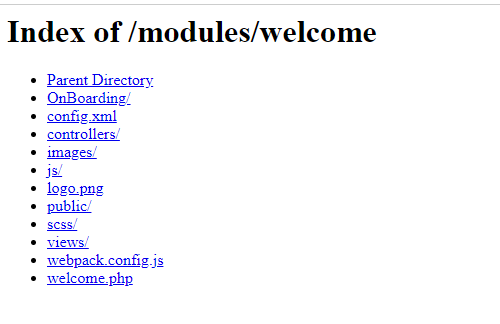
The following test is performed on a localhost server where it is enabled by default. If someone wants to see the contents of our module directory, they just have to fill in their path in their browser. He will then be able to access the list of PHP files and therefore search if some contain security vulnerabilities.
In my case, the URL is: http://localhost/prestashop/modules/welcome/
If I enter it in the address bar of my browser, the screen in the figure below is displayed:
In order to modify this behavior, add an index.php file in each directory. In our case, it will be in the following directories:
• /modules/welcome/
• /modules/welcome/anyfolder/
You can leave the index.php files empty or fill them with the following code:
<?php
header("Location: ../");
exit;
If you administer the web server, you can also choose to disable this option or use an .htaccess file to disable this feature.
Pass your module back to the validator: the number of errors in the Security section should have decreases.
Disallow direct file access
Of your PHP files that are in your modules, you should only have class definitions and no dots - except for Ajax scripts (and again, you should only go through front or admin controllers). It is still recommended to prohibit access to all subdirectories containing PHP files or templates.
This is not mandatory, but just in case, add a .htaccess file in all of the following directories:
• /modules/mymodule/classes/
• /modules/mymodule/controllers/
• /modules/mymodule/install/
• /modules/mymodule/views/templates/
The content of the last directory (templates) is normally already protected by a .htaccess present in the PrestaShop modules folder which contains the following lines:
<FilesMatch "\.tpl$">
Deny from all
</FilesMatch>
This prohibits access to files ending with the .tpl extension.
If this security was not in place, it would then be possible to view the code of a template simply by entering its path.
Under these conditions, if the code of your templates has a security vulnerability, no doubt someone will discover it.
Apache and Nginx Setups
Some Apache (or Nginx, depending on what you're using) configurations disallow the use of .htaccess files. This is why the index.php files, which hide the presence of the files, are also important.
Protect your code against SQL injections
Even though PrestaShop has been using the PDO library since version 1.5, it still does not call some important methods, such as bindParam() or bindValue(), which are designed to protect SQL queries. So we have to protect them manually.
-
Cast all your integers with (int), for example:
$result = Db::getInstance(_PS_USE_SQL_SLAVE_)->getRow('
              SELECT `id_country`, `id_state`, `vat_number`, `postcode` FROM `' . _DB_PREFIX_ . 'address`
WHERE `id_address` = ' . (int) $id_address);-
Cast your non-integer numeric values with (float), for the same reason as for integers.
-
Protect your character strings with the pSQL function.
This will protect your queries against SQL injections containing ' (called quotes).
For example, authentication, in the Employee.php class, is done as follows:
$result = Db::getInstance()->getRow('SELECT * FROM `'._DB_PREFIX_.'employee`
               WHERE `active` = 1
               AND `email` = \''.pSQL($email).'\'
               AND `passwd` = \''.Tools::encrypt($passwd).'\'');
Here is an example of a possible flaw:
The $email variable is of type POST. Therefore, if it were not protected with pSQL, it would be possible to inject the following code into the POST value:
[email protected]' OR `email` != '[email protected]' OR `passwd` ='testThe query would then become:
SELECT * FROM `ps_employee`
WHERE `active` = 1
AND `email` ='[email protected]' OR `email` != '[email protected]' OR `passwd` = 'test'
AND `passwd` = 'ddcdaee0a606202f4641ae3e8d5d7be7'-
Protect your field strings with the bqSQL function.
This will protect your queries against SQL injections containing “`” (called backquotes) when you use a character string to define a field, , then it calls pSQL()
Protect your template against XSS vulnerabilities
If you don't know what an XSS (Cross-Site Scripting) flaw is, I recommend that you do a quick search on the Internet.
The most common XSS error is using GET or POST values in templates. Here is an example of unprotected Smarty code:
{if $smarty.get.param}{$smarty.get.param}{/if}
And here is a way to exploit it:
index.php?param=<script>alert("BOOOOOM !")</script>
In this case, the JavaScript code passed in the URL will be executed when the page loads. A simple alert message is not really dangerous, but it would be possible for example to display a form (whose action attribute would point to a site owned by the person trying to exploit the flaw) which would invite visitors to authenticate.
In order to avoid this type of problem, use the native escape method. Refer to the official documentation for more details.
{if $smarty.get.param} {$smarty.get.param|escape:'htmlall'}New in PrestaShop 1.7
{/if}
Starting from PrestaShop 1.7, all Smarty variables are automatically "escaped" if you use the fetch method. It is therefore no longer necessary to add |escape:'htmlall'. On the other hand, to display HTML code, you will need to add |nofilter.
For more information on the subject, I invite you to read the following article .
You should always protect all data coming from users, and even from webservices. For example, the webservice we use in our module could be compromised. Indeed, you can never be sure of the security of the data sent by a third-party API.